
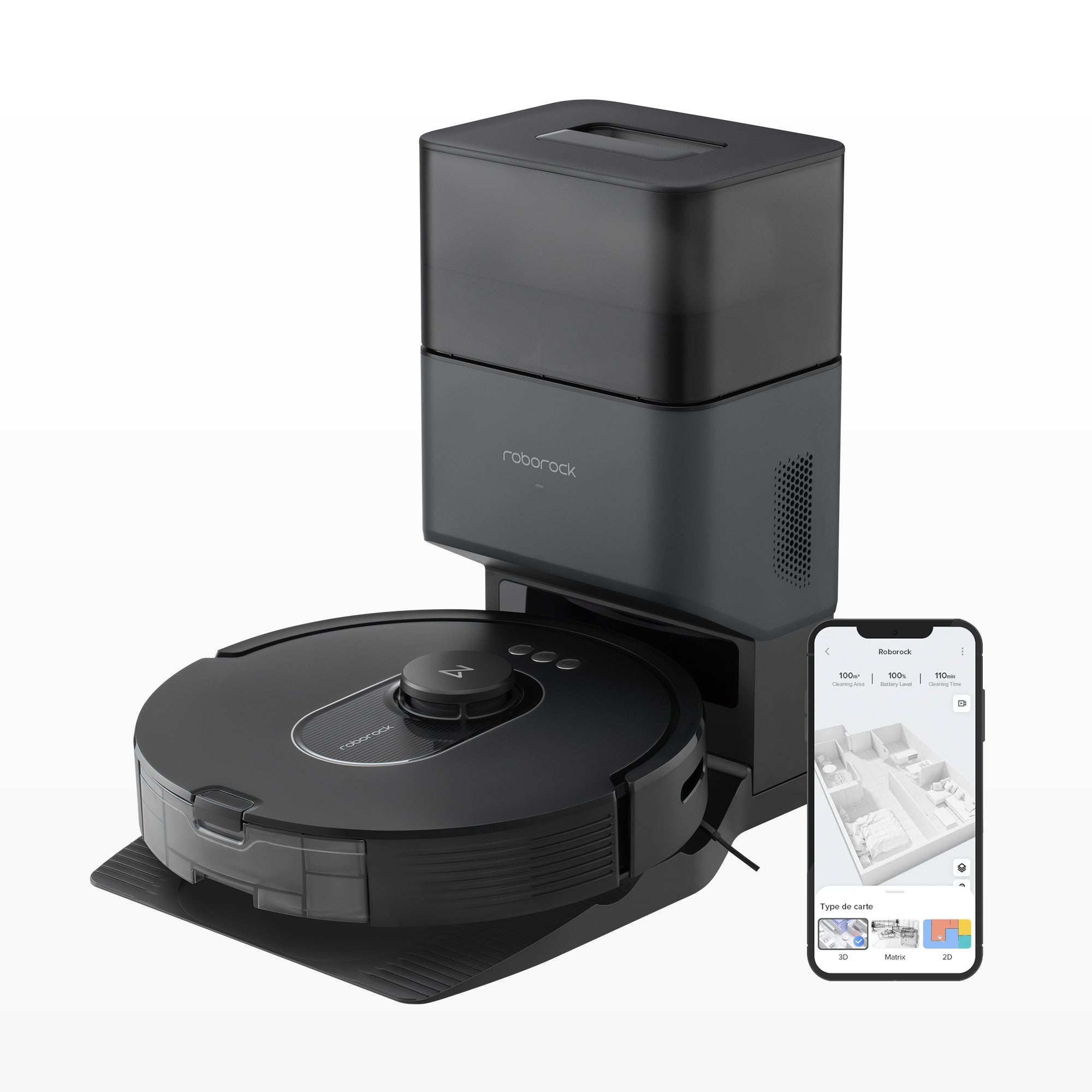
Your needs, this model
Does it fit your priorities?
Does the exact Q5 Max+ package include an auto-empty dock rather than a charge-only base?
Yes. The exact U.S. page names an Auto-Empty Dock and the manual supports the Q50ULE with AED06LRR or AED07LRR auto-empty docks. The exact included AED suffix is not printed.
Explore this need in the finder →Can the Q5 Max+ join a network where 2.4 GHz Wi-Fi is available?
Yes. The exact manual says only 2.4 GHz Wi-Fi is supported; 5 GHz-only networks are not supported.
Explore this need in the finder →Is the Q5 Max+ an appropriate choice when cleaning high-pile carpet is essential?
No. Its exact manual says not to use the robot on high-pile carpets and warns that effectiveness may be reduced on dark carpets.
Explore this need in the finder →The Roborock Q5 Max+ is a mapped robot vacuum sold as an auto-empty package, not a vacuum-mop. The U.S. native listing identifies one default variant, SKU RR-Q55MaxPlus-M1, and its manual names the robot Q50ULE. When checked, the official page said “Out of stock, coming soon” and the native variant was unavailable. The model still matters for a comparison, but that captured page is not a promise of current stock or a live purchase offer.
A dual-roller vacuum, with the usual owner work still attached
The named DuoRoller system uses two main brushes, and Roborock lists 5,500 Pa maximum suction. It also advertises a 99% hair-pickup rate from its own Max+ mode test. That figure is a maker test, not an independent result in a home like yours; it does not establish how it will handle a particular carpet, hair length, floor seam or amount of debris. The paired rollers are the main reason to look at this model if hair management is a concern, but they still need regular inspection. The manual calls for monthly main-brush cleaning and replacement every three to six months; the side brush is cleaned as required.
The dock changes the bin routine rather than ending maintenance. The U.S. page describes an Auto-Empty Dock / RockDock Plus package and a 2.5-liter E12-rated bag, with “up to seven weeks” before bag replacement. Roborock itself says the interval depends on use and the environment. A larger household, shedding pets or heavy daily runs may fill a bag much sooner. You will still buy and replace bags, clear the dock air duct when needed, and clean the robot. The exact page lists a dust bag in the box, but does not print the included dock’s model suffix. The manual names AED06LRR and AED07LRR as compatible auto-empty docks; it does not map this particular offer to one of them.
Mapped vacuuming, but no mop mode
PreciSense LiDAR navigation, schedules, room selection, no-go zones and maps for as many as four levels give the Q5 Max+ a more structured routine than a random-bounce cleaner. The page also mentions 3D map support and voice control through Alexa, Google Home and Apple Siri. Setup and app use require 2.4 GHz Wi-Fi; the manual says 5 GHz alone is unsupported. If your router broadcasts only a 5 GHz network, the app-dependent mapping features are not a workaround.
This package should not be mistaken for the Q10 X5+ or another robot that adds mopping. The Q5 Max+ listing does not name a mop, water tank or wet-cleaning routine. Its edge in the choice is simpler: mapped vacuuming, dual rollers and automatic bin emptying. If you need one machine to vacuum and mop, compare an exact combo model instead, such as the separately reviewed Q10 X5+; that configuration has its own mop mechanism and care routine.
Check the route before admiring the suction number
Roborock lists the robot at 13.9 by 13.8 by 3.8 inches and the dock at 12 by 17.3 by 16.7 inches. The robot’s height is the useful first screen for furniture, but leave real clearance rather than assuming a close nominal fit will work. The manual asks for a firm, flat dock location with at least one foot on both sides and three feet in front and above. That is more space than the dock’s footprint alone suggests.
The carpet restriction is decisive: the exact Q5 Max+ manual says not to use it on high-pile carpets and warns that effectiveness may be reduced on dark carpet. There is no positive pile-height range to compare against a thick rug. Do not treat the DuoRoller or the 5,500 Pa headline as an exception to that warning. A household with high-pile rugs should choose another documented fit. The exact product page also claims up to four hours from its 5,200 mAh battery and lists a 770 ml onboard bin. Both are manufacturer specifications, not a guarantee of a particular home’s cleaning coverage; suction mode and floor conditions matter.
Plan for a manual filter and bag cycle
The dock is for dust, not water: this is a vacuum-only setup with no mop washing, water tanks or plumbing. Roborock’s manual says to clean the dustbin and washable filter weekly, replace the filter every six to twelve months, and let the parts dry for at least 24 hours after rinsing. It also says to keep the robot and dock dry, clear loose cords and fragile objects from the path, and supervise the first route. Those are practical limits, not optional extras for a station advertised as hands-free.
Who should keep it in the comparison?
The Q5 Max+ is most relevant to someone who wants scheduled LiDAR vacuuming, a dual-roller brush and dust-bag auto-emptying, does not need mopping, has 2.4 GHz Wi-Fi, and has no high-pile carpet to clean. Its 7-week bag statement and four-hour runtime are ceilings in Roborock’s claims, not service guarantees or independently measured performance.
Do not select it for a high-pile requirement, a 5-GHz-only network, a mop, or an installation that depends on knowing the exact AED dock suffix. The separate Q5 DuoRoller+ page describes the same Q50ULE robot family and nearly the same headline operating plan, but it is a distinct U.S. native SKU and its box list differs. The two listings should not be merged or treated as interchangeable bundles. Check the exact offer and package details when the manufacturer makes either one orderable again.
Key details at a glance
| Manufacturer-listed maximum suction | 5500 Pa |
|---|---|
| Robot height | 3.8 in |
| Robot weight | 16 lb |
| Manufacturer-reported dock dimension sequence (axes unspecified) | 12 × 17.3 × 16.7 |
| Battery capacity | 5200 mAh |
| Mop system | Vacuum-only; no mop system |
| LiDAR retracts under low furniture | No |
| 2.4 GHz Wi-Fi supported | Yes |
| 5 GHz Wi-Fi supported | No |
| Manufacturer carpet-pile support claim | No |
| Dock water hookup | Standard charging dock; manual bin emptying; no dock water service |
| Fixed water supply and drain required | No |
| Dock empties dust automatically | Yes |
| Maximum manufacturer-claimed base dust capacity window | 49 days |
Use the exact model’s instructions for operating limits, supplied equipment and version differences.
Sources for this assessment

Check the fit before choosing the dock.
Compare your furniture clearance, network, floors and the work the station still asks you to do.