
Your needs, this model
Does it fit your priorities?
Can the Y354020 AutoEmpty package automatically transfer dust from the robot to a bagged dock?
Yes. iRobot specifies the AutoEmpty Dock and advertises up to 75 days between dust-bag attention, a maximum claim rather than a fixed interval.
Explore this need in the finder →Is the included flat microfiber pad an essential mop-system choice for this package?
Yes. Its mop is a removable microfiber cloth supplied with micro-pump water delivery, not the powered roller or dual spinning pads used by other designs.
Explore this need in the finder →Will the 4.09-inch robot meet a 4.25-inch listed body-height ceiling?
Its product page lists 4.09 inches high. The nominal specification is under 4.25 inches, but the robot needs practical room and route clearance.
Explore this need in the finder →Does the exact 105 Combo + AutoEmpty setup require 2.4 GHz Wi-Fi?
Yes. The US page says 2.4 GHz is required for robot setup and operation; a 5 GHz-only network is not supported.
Explore this need in the finder →Does its dock supply a manufacturer-published 75°C mop wash?
No. AutoEmpty is a dust dock. The reviewed product page and exact family manual describe manual mop-pad care; no dock wash-temperature figure is documented.
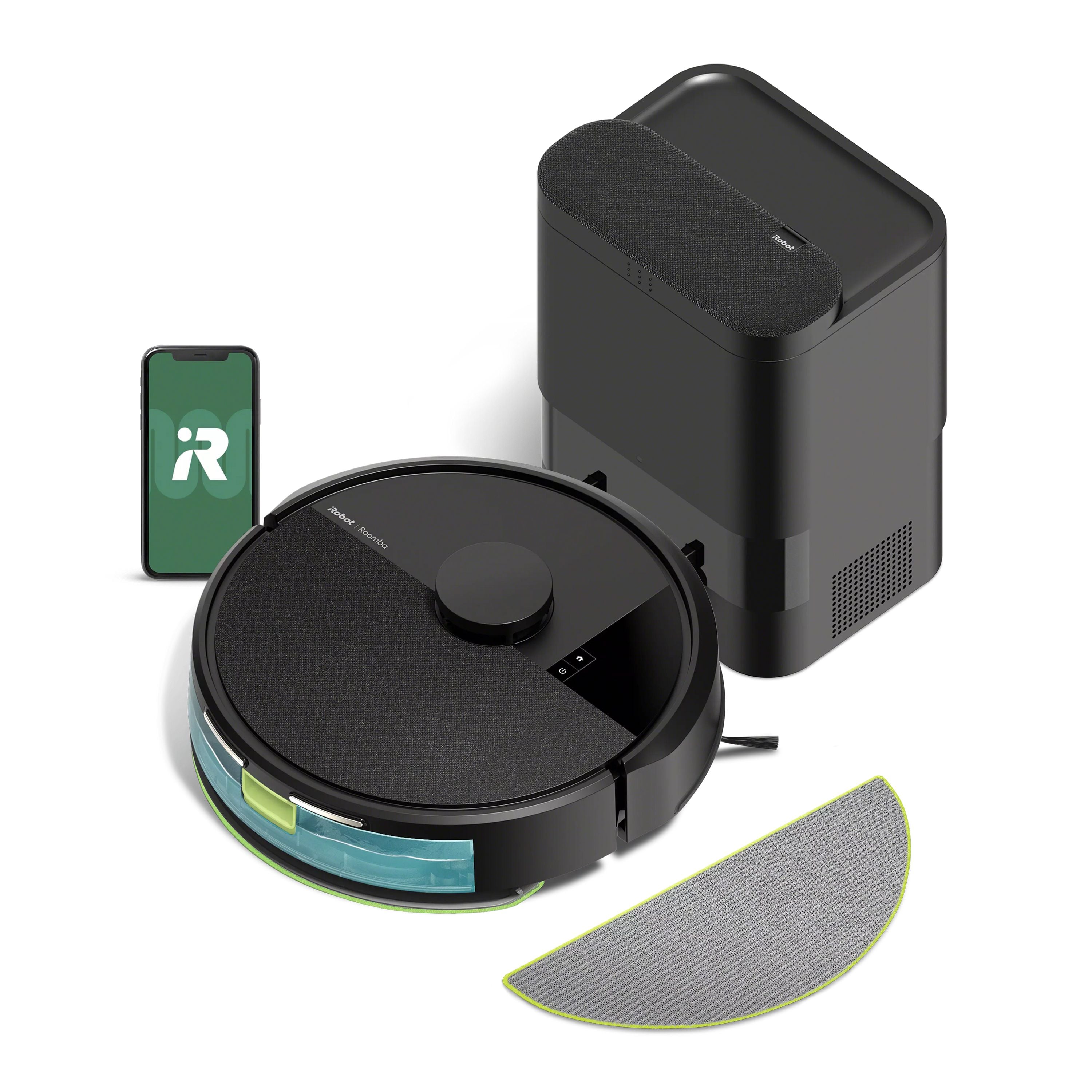
Explore this need in the finder →The Roomba 105 Combo + AutoEmpty adds a bagged dust-transfer dock to iRobot’s mapped vacuum-and-mop robot. This assessment covers the US Y354020 black package and its Smoke finish Y351420 variant. Both are the same functional type: the meaningful difference from the charge-only 105 Combo is automatic dust emptying, not a more capable mop station.
What the AutoEmpty dock changes
After a cleaning run, the robot empties dust into the dock’s bag. iRobot advertises up to 75 days before the bag needs attention, a maximum claim rather than a service interval to count on in a home with pets, frequent runs or heavy debris. Eventually you still remove and replace the bag, and the robot’s brushes, filter, bin, wheels and contacts still need care. The station is useful if lifting dust from the robot bin is the chore you most want to reduce; it does not remove maintenance altogether.
The dock does not wash, dry or refill the mop. There is no dock water service in this package. Mopping still means filling the robot’s small combo bin, attaching its reusable microfiber pad and removing the damp pad for care afterward. That is an important distinction from a more elaborate station: “self-emptying” refers to dust, not to the wet side of the cleaning routine.
It keeps the 105 Combo’s navigation and mop choices
The robot offers vacuum-only, mop-only and combined vacuum-mop modes. ClearView LiDAR maps the rooms; app controls include scheduling and room targeting, and the wet modes use a micro-pump to feed water to a flat microfiber pad. iRobot says Carpet Detect avoids rugs during mop-only and combined runs. Those features are shared with the charge-only Y314020, so the additional dock is not an upgrade to mop movement, navigation or floor handling.
The Y354020 product page lists the same body dimensions—13.23 by 13.19 by 4.09 inches—and a robot weight of 6.45 pounds. The charge-only page prints a slightly different weight for what otherwise appears to be the same robot, so use the larger figure when checking a lift limit and confirm the exact item code on any retail offer. At 4.09 inches high, it is not a solution for low furniture. Measure the whole route, including rugs and soft skirts, before expecting it to reach a room.
iRobot’s current Y351420 page calls the product a Smoke finish and its product details and package list identify a 105 Combo + AutoEmpty dock. That SKU is treated here as a color variant of this same dock configuration, not a separate cleaning system. Y354020 is the black offer. The exact variant matters for purchase searches, but neither finish changes the automatic dust-emptying versus manual mop-care tradeoff.
Shared limitations matter as much as the dock
Setup and continued operation require 2.4 GHz Wi-Fi; a 5 GHz-only network is not supported. The robot can map up to three floors according to iRobot’s product information, and it is controlled through the Roomba Home app, its buttons or a compatible voice assistant. The manufacturer compatibility chart lists up to 120 minutes of hard-floor runtime from iRobot’s Home Test Lab (actual runtime varies) and a 7,000 Pa suction figure for the 105 series. Those figures describe the company’s claims and lab conditions, not a guarantee of cleaning time or pickup in a particular plan.
The 105 Combo’s washable bin is listed with 400 ml of dry debris capacity and 200 ml for liquid. The dock’s bag can postpone dust disposal, but it does not enlarge the onboard tank or allow the robot to mop unattended indefinitely. iRobot’s “up to 75 days” emptying estimate and “up to 30 uses” for a pad should be read as upper claims; usage and care determine the real interval. Review the cleaning-solution guidance before adding anything other than water.
Carpet Detect helps avoid rugs while the damp pad is installed, but the reviewed US materials do not publish a pile-height limit for this model. A thick, fringed or unstable rug needs a supervised test or a separate no-go boundary; do not turn automatic detection into a guarantee. If your priority is carpet coverage or low furniture, compare the exact height and manual limits of a vacuum-focused alternative before valuing the dock.
When it makes sense—and when it does not
Choose the AutoEmpty version if you want a combo robot, appreciate scheduled room cleaning and specifically want a bag to take dust from the robot after runs. Compared with Y314020, you trade extra station space and eventual bag replacement for less frequent hand-emptying. Choose the charge-only version if you do not need that dust service and want the simpler package. Choose neither if you expect automatic mop washing or drying: both 105 Combo packages leave cloth care to you. The Roomba Plus 405 Combo, for example, belongs to a different AutoWash dock class, but its separate exact model and cleaning system must be evaluated on its own merits.
This is not a hands-off floor-care system. Empty the dirty robot bin only when necessary, change the dock bag when full, wash the microfiber pad, and inspect the brushes. If that remaining work suits your routine—and the 4.09-inch robot clears every required opening—the AutoEmpty dock offers a precise convenience rather than a universal performance upgrade.
Manufacturer references: Roomba 105 Combo + AutoEmpty, Y354020, Smoke finish, Y351420, and iRobot Roomba feature and compatibility chart.
Key details at a glance
| Manufacturer-listed maximum suction | 7000 Pa |
|---|---|
| Robot height | 4.09 in |
| Robot weight | 6.45 lb |
| Battery capacity | 3000 mAh |
| Mop system | Flat removable microfiber pad with pump-fed water |
| 2.4 GHz Wi-Fi supported | Yes |
| 5 GHz Wi-Fi supported | No |
| Dock water hookup | Dust-empty dock; no dock water service |
| Fixed water supply and drain required | No |
| Dock empties dust automatically | Yes |
Use the exact model’s instructions for operating limits, supplied equipment and version differences.
Sources for this assessment
- iRobot US Roomba 105 Combo Robot + AutoEmpty Dock product page, black SKU Y354020
- iRobot US Roomba 105 Combo + AutoEmpty product page, Smoke SKU Y351420
- iRobot All Roomba Features and Compatible Parts (US support)
- iRobot All Roomba Features and Compatible Parts (US support)
- iRobot US Vacuums collection first page, 12 of 20 listed result rows
- iRobot US Vacuums collection Load More page (8 more rows)
- Official multilingual Roomba 105 Vac/Combo owner manual, charge dock family
- Official multilingual Roomba 105 Vac/Combo + AutoEmpty Dock owner manual family
- CPSC Recall and Product Safety search, exact Roomba 105 Combo/Y314020/Y354020 terms
Check the fit before choosing the dock.
Compare your furniture clearance, network, floors and the work the station still asks you to do.